Are you looking for a powerful tool to make your language learning journey more effective and enjoyable? Look no further than Language Reactor, a Chrome extension designed specifically for language learners. With a total rating of 4.33 based on user reviews, this extension is a game-changer when it comes to improving your language skills.
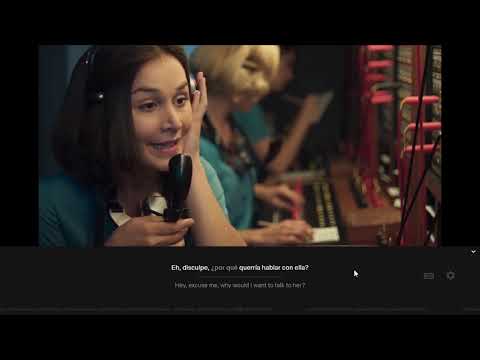
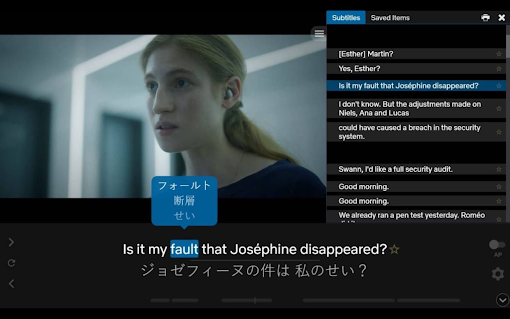
One of the standout features of Language Reactor is its compatibility with popular streaming platforms like Netflix. Formerly known as 'Language Learning with Netflix', this extension takes your language learning experience to the next level while watching your favorite films and series. It adds dual language subtitles, allowing you to follow along in both your target language and your native language. This feature is incredibly helpful in understanding the differences between what is being said and what is written in the subtitles.
In addition to dual language subtitles, Language Reactor also offers a popup dictionary. This means that you can instantly look up the meaning of any word or phrase by simply hovering over it. The convenience of having a dictionary at your fingertips while watching Netflix cannot be overstated. It eliminates the need to pause the video and search for definitions, allowing for a seamless and uninterrupted learning experience.
Another notable feature of Language Reactor is its precise video playback controls. With this extension, you have full control over the speed of the video playback. You can slow down the video to better understand the dialogue or speed it up to challenge your listening skills. This flexibility in video playback is invaluable for language learners.
But Language Reactor doesn't stop at Netflix. It also supports YouTube, giving you access to thousands of channels and videos on any topic you can imagine. By watching authentic language content on YouTube, you can immerse yourself in real-life conversations and improve your comprehension skills.
Furthermore, Language Reactor extends its benefits beyond streaming platforms. You can import text from books and websites, and the extension will provide a machine translation in your native language. This feature is incredibly useful for reading materials in your target language and understanding the content without getting lost in translation. Additionally, Language Reactor offers a super-realistic text-to-speech feature, allowing you to listen to the text being read aloud with natural-sounding voices.
Whether you are learning a new language or improving your existing language skills, Language Reactor is the perfect companion for your language learning journey. Compatible with Google Chrome on desktop and laptop computers running Windows and MacOS, this extension is easily accessible and user-friendly.
Try Language Reactor today and experience the difference it can make in your language learning progress. Don't just take our word for it - the glowing reviews from users like Samuel Haber, Phúc Nguyễn, and Cin S speak for themselves. Start your language learning adventure with Language Reactor and unlock your full language learning potential.

















30 Reviews For This Extension
I'm unable to get the ASR subtitles because every time I get the "Problem fetching ASR subs. SERVER_ERROR" error and there is no support whatsoever to help.
it is really super helpful. I was using duolingo for spanish learning. it teach me better than duolingo. I think
USELES THING NO TURKISH GO ENTER YOUR ACCOUNT NOT WORKING I CLICED FORGOT PASSWORD NO EMAIL COMING MYYYYY GODDDD BYE
This seems to have broken recently. The subtitles will go away too quickly before the person has even finished what they have to say edit: this seems to have been fixed now. I checked the same vid that had issues and it works fine.
I can't believe I found the exact extension I wanted and it goes beyond expectations. You get a double translation subtitle, and there are even hotkeys to move back n forth to subtitled moments. Perfect work!
I love this extension but for the last couple months I've been getting a "make-ready" error that prevents me from seeing any of the ASR subtitles which has defeated the only purpose of the extension. I don't want to unsubscribe to the extension but until the bug is fixed that's my only option
it sure acomplishes it's purpose
My most important tool for studying Korean
This the greatest app I have ever seen for subtitle and learning a language. Easy to use and user friendly.
Great, but can you add a feature for users to adjust the position of the subtitles/translation? It's sort of in the middle of the screen
I totally love it! ❤️
Please can make the app work in Brave Thank you
It only translates YT videos where there is already a subtitle present ?? What is the point of that ?? This is a waste of time and disk space.
Thank you for helping me study through English lectures on youtube !!
THANK UU SO MUCH
i wish i can find another app because this app not showing the two substitles i need to press every single time its annoying really hopefully its worth it ...we pay exact amount then why should hide two substitles after i one year if the two substitles not showing i will not subscribe or pay anymore
It used to work just fine. and i really love it since i can learn languages from this extension and it also help me to just go back one line (pressing a / d - usually if i go back from netflix it will move me back 5-10s back). But i don't know why now it can't show any subtitle. It's written "loading subtitle" there. Please fix this asap
good
Good,it's available
you can‘t use it without money!!! fuxk off
Paid for the pro, but still not able to save words because the netflix setting of language reactor is saying it is not signed in, and it opens up a new tab in which i am already signed in. Totally wasted my money
waited for what felt like a eternity and still nothing loaded!
very good at the time of using it but servers are down :(
been using for 4 years. the new ai thing is a great feature for agglutinative languages
Oh my god, how have i never heard of this, it is exactly what i have been looking for! And it's free!?!?!?!?! Im sure i sound like one of those fake reviews made by bots or something but if you are reading this and are looking to learn a language you need to try this extension!!!! if you somehow don't like it you can always remove it, but please try it!! I am so mad it took me this long to find it myself!
Excited about it. I can learn Enghlish with Youtube.
perfect and have a many usefull feature, it's the best for learning english from movies
This explains words based on the context on YouTube. It's absolutely insane. I really like it... However, it is inconvenient that a login prompt appears even after I'm logged in, and if I right-click and select "read in Language Reactor," it doesn't read immediately like other apps; instead, I have to click more than three times to proceed. Also, even if I set it up to display both Korean and English, it is inconvenient to have to set it up again every time I restart the computer. Maybe it's because I use both a Mac and an Android PC, but anyway, there are some minor bugs, so I would like to give it 4.5 points, but since that is impossible, I am giving it 4 points.
All this time and I still have to manually set it to Ukrainian audio + Ukrainian ASR subtitles. It reverts back to English without fail. Fix. Your. App.
wish i could modify shortcuts